WordPress remains the most popular content management system in the world, powering over 40% of the web. Its flexibility, extensibility, and ecosystem of themes and plugins make it uniquely suited for custom web development. When it comes to building highly tailored WordPress sites—whether for brands, ecommerce stores, portfolios, or enterprise platforms—choosing the right website builder can make all the difference in speed, quality, SEO performance, and scalability.
Not all WordPress builders are created equal. Some are ideal for designers with limited coding experience. Others empower developers to create fully custom layouts, modular components, and dynamic experiences without limits. Here is a deep dive into the top 5 website builders that elevate custom WordPress development in 2026.
Importance of Choosing the Right Website Builder
Choosing the right website builder is crucial for anyone looking to establish a robust online presence. The website builder you select will dictate not only how your site looks but also how it performs, how easily you can make updates, and how it scales as your business grows. With custom WordPress development, the flexibility and power of the platform can be fully utilized only if the right tools are in place. A good builder saves time, reduces frustration, and ensures that the final product is both professional and functional.
Moreover, the choice of a website builder impacts your SEO efforts, mobile responsiveness, and user experience. A user-friendly interface facilitates quick edits, while advanced customization options allow for a unique and personalized aesthetic. Additionally, reliable customer support from the builder can be a lifesaver when technical issues arise or when you need guidance on advanced features. Hence, making an informed choice is not just about the initial setup but about long-term success.
The right website builder also plays a significant role in your site’s security and performance. Optimized code, regular updates, and compatibility with key plugins ensure that your WordPress site runs smoothly and is protected from vulnerabilities. These aspects are particularly important for businesses that handle sensitive customer information or rely on their website for significant revenue. By choosing a builder that excels in these areas, you can focus on growing your business rather than worrying about technical glitches or security breaches.
Overview of Top Website Builders for WordPress
The market is flooded with numerous website builders, each offering a unique set of features tailored to different needs. However, when it comes to custom WordPress development, a few stand out due to their versatility, ease of use, and comprehensive feature sets. These builders not only simplify the design process but also offer powerful tools for customization, making them ideal for both beginners and experienced developers.
In this article, we will explore the top five website builders that excel in custom WordPress development. These builders are Elementor, Beaver Builder, Divi, WPBakery, and Oxygen. Each of these has its own strengths and weaknesses, making them suitable for different types of projects and user preferences. By understanding the features, pros, and cons of each, you can make an informed decision that aligns with your specific needs and goals.
Whether you are looking for a drag-and-drop interface, advanced design options, or integration with other tools, these top builders have you covered. They offer a range of functionalities that cater to various levels of expertise and project requirements. From simple blog layouts to complex e-commerce sites, these builders provide the flexibility and power needed to create stunning websites that perform well and attract visitors.
Elementor – Features, Pros, and Cons
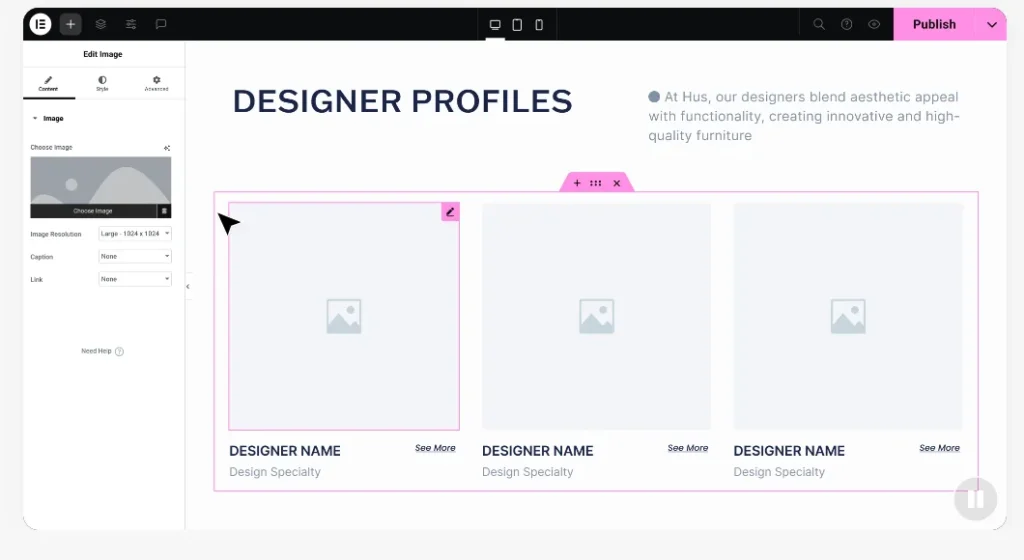
Elementor is one of the most popular website builders for Custom WordPress Development, and for good reason. Its intuitive drag-and-drop interface makes it easy for users of all skill levels to create custom layouts without touching a single line of code. Elementor offers a wide range of widgets and templates that can be customized to fit any design vision. Whether you’re building a simple portfolio or a complex e-commerce site, Elementor provides the tools to bring your ideas to life.
One of the standout features of Elementor is its Theme Builder, which allows users to design every part of their website, from headers and footers to archive pages and single post templates. This level of control ensures a cohesive and professional look across the entire site. Additionally, Elementor’s responsive design capabilities ensure that your website looks great on any device, which is crucial in today’s mobile-first world.
Despite its many strengths, Elementor is not without its drawbacks. Some users have reported that the builder can be resource-intensive, which may slow down site performance on lower-end hosting plans. Additionally, while the free version of Elementor offers a lot of functionality, some advanced features are locked behind the Pro version, which requires a subscription. However, for those who are serious about custom WordPress development, the investment is often worth it.
Beaver Builder – Features, Pros, and Cons
Beaver Builder is another top contender in the realm of WordPress website builders. Known for its user-friendly interface and robust feature set, Beaver Builder makes it easy to create custom layouts with its drag-and-drop functionality. One of its key selling points is its clean code output, which ensures that websites built with Beaver Builder are fast and SEO-friendly. This focus on performance makes it a popular choice among developers who prioritize site speed and search engine optimization.
Another notable feature of Beaver Builder is its flexibility. The builder works seamlessly with any WordPress theme, giving users the freedom to switch themes without losing their custom layouts. This is particularly beneficial for those who like to experiment with different design aesthetics or need to update their site’s look and feel periodically. Additionally, Beaver Builder offers a range of pre-designed templates that can be customized to suit any project, saving time and effort.
On the downside, Beaver Builder’s free version is quite limited compared to some of its competitors. While it provides a solid introduction to the builder’s capabilities, users will need to upgrade to the premium version to unlock its full potential. Additionally, while Beaver Builder is highly versatile, it may not offer as many advanced customization options as some other builders. However, for those looking for a reliable and easy-to-use builder, Beaver Builder is a strong choice.

DIVI – Features, Pros, and Cons
Divi, developed by Elegant Themes, is a powerful and versatile website builder that has garnered a loyal following among WordPress users. One of Divi’s standout features is its Visual Builder, which allows users to design their websites in real-time, directly on the front end. This WYSIWYG (What You See Is What You Get) interface makes it incredibly easy to see how changes will look as you make them, streamlining the design process and reducing the need for constant previews.
Divi also boasts a robust set of modules and design options, making it one of the most customizable builders on the market. Users can adjust everything from spacing and alignment to colors and typography, ensuring that every element of their site is perfectly tailored to their vision. Additionally, Divi’s Theme Builder provides comprehensive control over the entire site’s design, from headers and footers to category pages and post templates.
However, Divi is not without its criticisms. Some users have noted that the builder can be somewhat overwhelming due to its extensive range of options and settings. This steep learning curve may be a drawback for beginners who are new to website design. Additionally, like many other builders, Divi’s most powerful features are only available in the premium version, which requires a yearly or lifetime subscription. Despite these drawbacks, Divi remains a top choice for those looking for a highly customizable and feature-rich builder.
WPBakery – Features, Pros, and Cons
WPBakery, formerly known as Visual Composer, is a veteran in the WordPress website builder space. Its drag-and-drop interface allows users to create custom layouts with ease, and its compatibility with a wide range of themes and plugins makes it a versatile choice for any project. One of WPBakery’s key strengths is its extensive library of content elements, which includes everything from text blocks and images to sliders and video players.
In addition to its user-friendly interface, WPBakery offers a robust set of design options that allow users to customize every aspect of their site. The builder’s intuitive backend editor makes it easy to add and arrange elements, while the front-end editor provides a real-time preview of changes. This dual editor approach ensures that users have full control over their site’s design and functionality.
Despite its many strengths, WPBakery has faced some criticism over the years. Some users have reported that the builder can produce bloated code, which may impact site performance. Additionally, while WPBakery is highly versatile, its user interface can feel somewhat dated compared to newer builders on the market. However, for those looking for a reliable and established builder with a wealth of features, WPBakery remains a solid choice.
Oxygen – Features, Pros, and Cons
Oxygen is a relatively new player in the WordPress website builder market, but it has quickly gained a reputation for its powerful and innovative features. Unlike traditional builders, Oxygen is designed for developers and advanced users who want complete control over their site’s design and code. The builder’s interface allows users to create custom layouts using a combination of drag-and-drop elements and hand-coded components, providing unparalleled flexibility.
One of Oxygen’s standout features is its ability to create custom templates and dynamic data integrations. This makes it an ideal choice for complex projects that require advanced functionality, such as membership sites or e-commerce platforms. Additionally, Oxygen’s clean code output ensures that websites built with the builder are fast and optimized for performance, which is crucial for both user experience and SEO.
However, Oxygen’s advanced capabilities come with a steep learning curve. The builder’s interface and feature set may be intimidating for beginners or those who are new to website design. Additionally, Oxygen is a premium builder, with no free version available, which may be a barrier for some users. Despite these challenges, Oxygen is a top choice for developers and advanced users who need a powerful and flexible builder for custom WordPress development.
Comparing the Top Website Builders
When comparing the top website builders for custom WordPress development, it’s important to consider your specific needs and goals. Each builder offers a unique set of features and capabilities, making them suitable for different types of projects and user preferences. For example, Elementor and Divi are known for their user-friendly interfaces and extensive customization options, making them ideal for beginners and those who want a high level of design flexibility.
On the other hand, builders like Beaver Builder and WPBakery offer a more balanced approach, with a focus on performance and compatibility with a wide range of themes and plugins. These builders are well-suited for users who need a reliable and versatile tool that can handle a variety of design and functionality requirements. Additionally, Oxygen stands out for its advanced features and clean code output, making it a top choice for developers and advanced users who need complete control over their site’s design and functionality.
Ultimately, the best website builder for your needs will depend on your specific project requirements, level of expertise, and budget. By carefully considering the features, pros, and cons of each builder, you can make an informed decision that will help you create a stunning and functional WordPress site that meets your goals.

Additional WordPress Themes Worth Considering in 2026
Custom WordPress development is not limited to choosing the right website builder alone. Selecting a lightweight, performance-oriented theme plays an equally important role in site speed, SEO, and long-term scalability. In 2026, themes such as GeneratePress, OceanWP, and Kadence have become increasingly popular among developers and U.S.-based businesses due to their clean code structure and flexibility.
GeneratePress is widely recognized for its minimal footprint and excellent performance optimization. It works seamlessly with most modern WordPress builders and is often preferred for SEO-focused and content-driven websites. OceanWP offers a balance between design flexibility and built-in functionality, making it suitable for ecommerce and service-based websites that require ready-made layouts without compromising customization.
Kadence has emerged as a modern, performance-first theme that integrates well with WordPress core features. It provides advanced layout controls while maintaining fast load times, making it a strong choice for businesses planning scalable, long-term WordPress solutions.
Choosing the right theme alongside a capable builder ensures that your custom WordPress website remains fast, stable, and easy to maintain as web standards continue to evolve.
Headless WordPress: A Growing Trend in Custom Website Development
Beyond traditional WordPress builders and themes, headless WordPress is gaining strong momentum in 2026 as a future-ready approach to custom website development. This architecture is especially appealing to businesses that require high performance, advanced user experiences, and multi-platform content delivery.
In a headless WordPress setup, WordPress functions purely as a content management system, while the frontend is built using modern JavaScript frameworks such as React or Next.js. This separation allows developers to create faster, more secure, and highly customized websites that meet modern performance benchmarks and Core Web Vitals requirements.
Headless WordPress is particularly beneficial for U.S. businesses focused on scalability, custom integrations, and long-term technical flexibility. While it requires a higher level of development expertise, the advantages in speed, security, and omnichannel capability make it an increasingly popular choice for enterprise-level and fast-growing brands.
Need Expert Help with Custom WordPress Development?
Choosing the right combination of website builder, theme, or headless WordPress architecture can be challenging, especially when performance, SEO, and scalability are critical to your business goals.
If you are planning to build a custom WordPress website, optimize an existing site, or explore headless WordPress solutions, our team of experts can help you make the right decisions and implement a solution tailored to your needs.
👉 Book a consultation call today and get expert guidance on building a future-ready, high-performing WordPress website.
Conclusion: Choosing the Best Builder for Your Needs
Choosing the best website builder for custom WordPress development is a critical decision that can have a lasting impact on your online presence. Each of the builders discussed in this article offers a unique set of features and capabilities, making them suitable for different types of projects and user preferences. Whether you prioritize ease of use, advanced customization options, or clean code output, there is a builder that will meet your needs.
Elementor and Divi are excellent choices for those who want a user-friendly interface and extensive design options. These builders make it easy to create custom layouts without touching a single line of code, making them ideal for beginners and those who want to focus on design rather than development. Beaver Builder and WPBakery offer a more balanced approach, with a focus on performance and compatibility with a wide range of themes and plugins. These builders are well-suited for users who need a reliable and versatile tool that can handle a variety of design and functionality requirements.
For developers and advanced users, Oxygen offers a powerful and flexible builder that provides complete control over the design and code. While Oxygen’s advanced features may come with a steep learning curve, the builder’s clean code output and dynamic data integrations make it an ideal choice for complex projects. By carefully considering the features, pros, and cons of each builder, you can make an informed decision that will help you create a stunning and functional WordPress site that meets your goals.