The digital world is evolving faster than ever. Websites today must be lightning-fast, secure, scalable, and capable of delivering content across multiple platforms — websites, apps, digital screens, and more. Traditional WordPress developement, while still powerful, often hits limitations in speed, flexibility, and performance as websites scale.
This is where Headless WordPress becomes a revolutionary solution.
In this ultimate guide, we break down everything you need to know about Headless WordPress — from the basics to advanced architecture, business ROI, SEO benefits, developer workflows, use cases, and future trends.
Whether you are a business owner, marketer, developer, or agency, this guide will give you a complete understanding of how headless architecture can transform your digital presence.
1. What Is Headless WordPress? (Beginner-Friendly)
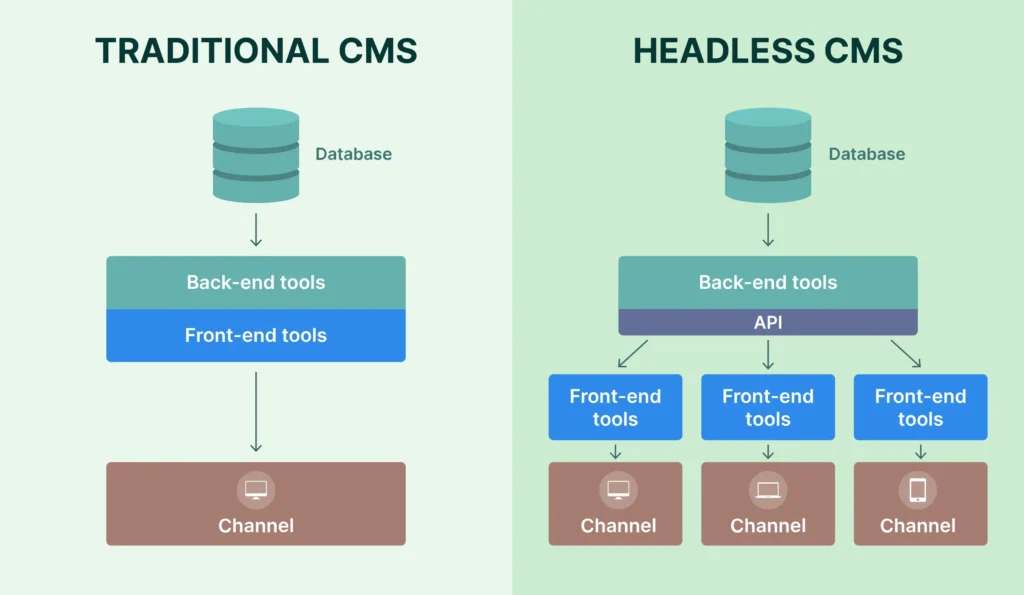
Headless WordPress is a modern approach where WordPress is used only as a backend CMS, while your website’s frontend is built using technologies like React, Next.js, Vue, Angular, or Svelte.
In simple words:
WordPress manages the content, and a modern framework controls how the content is displayed.
How it works:
- You create content inside WordPress (normal dashboard)
- The frontend fetches this content using the REST API or GraphQL
- The website loads super fast because the frontend is built with modern JavaScript technologies
This “decoupling” gives you full control and better performance compared to traditional WordPress themes.
2. Why Headless WordPress Is Becoming So Popular
The rise of headless architecture is driven by 3 core needs:
✔ Speed
Websites built with Next.js or Gatsby load incredibly fast, improving conversions and SEO.
✔ Security
The WordPress backend is hidden from the public, reducing hacking attempts.
✔ Flexibility
You can design anything without theme limitations.
From small startups to enterprise brands, more companies are shifting to headless setups to future-proof their websites.
3. Business Benefits of Headless WordPress
If you’re a business owner or marketer, here’s why Headless WordPress is a smart investment:
3.1 Faster Loading = Higher Conversions
Even a one-second delay reduces conversions by up to 20%.
Headless websites load almost instantly because:
- They pre-render pages
- They use global CDNs
- The browser loads less code
This leads to better user experience and higher sales.
3.2 Enterprise-Level Scalability
Businesses that experience sudden traffic spikes (e.g., during campaigns) benefit from:
- Load balancing
- CDN caching
- Static site generation
Your website remains stable even under heavy traffic, unlike many traditional WordPress installs.
3.3 Multi-Channel Publishing
Headless WordPress lets you publish content to:
- Web apps
- Mobile apps
- Smart TVs
- Digital kiosks
- Wearables
All from one backend — a huge advantage for brands that need omnichannel consistency.
3.4 Improved Security
Since the WordPress frontend is not exposed, hackers cannot target themes, plugin vulnerabilities, or login pages.
This drastically reduces risks for businesses handling sensitive data.
3.5 Long-Term Cost Efficiency
While headless setups require a higher initial investment, businesses save money in the long run through:
- Fewer plugin dependencies
- Reduced server load
- Lower maintenance
- Easier redesign cycles
4. Technical Deep-Dive: How Headless WordPress Actually Works
This section is for developers, agencies, or anyone interested in understanding the architecture.
4.1 Core Components of Headless Architecture
Backend (WordPress CMS)
- Stores the content
- Provides REST API or GraphQL
- Handles admin users and roles
API Layer
- Retrieves posts, pages, ACF fields, menus, media, etc.
- WPGraphQL is often faster and more structured
Frontend Application
- Built using React, Next.js, Vue, Svelte, Angular, etc.
- Responsible for design, layouts, and performance
Hosting Infrastructure
- Backend: WP Engine, Kinsta, Cloudways
- Frontend: Vercel, Netlify, AWS, Cloudflare
4.2 REST API vs GraphQL: Which is Better?
REST API
- Simple, native in WordPress
- Great for beginners
- Slower for large queries
GraphQL (WPGraphQL Plugin)
- Faster
- More optimized queries
- Perfect for enterprise & complex schemas
Most modern headless builds use GraphQL due to its speed advantage.
4.3 SSR, SSG, ISR — What Do They Mean?
SSR (Server-Side Rendering)
Pages are generated on the server each time a user visits.
Great for dynamic content.
SSG (Static Site Generation)
Pages are pre-built at deploy time.
Ultra-fast, perfect for blogs and landing pages.
ISR (Incremental Static Regeneration)
Pages update in the background without rebuilding the whole site.
Offered by Next.js — the best of both worlds.
5. Headless WordPress vs Traditional WordPress
| Feature | Traditional WordPress | Headless WordPress |
|---|---|---|
| Speed | Moderate | Extremely Fast |
| Security | Vulnerable | Much safer |
| Flexibility | Limited by themes/plugins | Unlimited |
| Multi-platform | Not ideal | Perfect |
| SEO | Good | Excellent |
| Development | Easy | Advanced |
| Scalability | Limited | Enterprise-grade |
If performance, scalability, and future-proofing matter — headless wins.
6. SEO Advantages of Headless WordPress
Many people think JavaScript sites are bad for Search Engine Optimization, but with Next.js or Gatsby, the opposite is true.
6.1 Faster Page Speeds
Google prioritizes websites with fast load times.
Headless frameworks excel at:
- Minimizing code
- Pre-rendering pages
- Serving content through global CDNs
This boosts rankings instantly.
6.2 Better Core Web Vitals
Metrics such as LCP, FID, and CLS improve naturally with headless systems, leading to higher SERP performance.
6.3 Clean HTML Output
Traditional WP themes load unnecessary scripts.
Headless websites load only what’s needed.
6.4 Structured Content Improves Indexing
Consistent schema and content separation make it easier for search engines to crawl and rank content.
7. Use Cases: When Should You Choose Headless WordPress?
✔ High-traffic news portals
✔ E-commerce (WooCommerce + React)
✔ SaaS dashboards
✔ Real estate platforms
✔ Multi-lingual websites
✔ Mobile apps powered by WordPress
✔ Media & entertainment websites
✔ Brands needing pixel-perfect custom UI
If your project requires speed, security, or custom applications — headless is ideal.
8. Tools & Frameworks for Headless WordPress
8.1 Frontend Frameworks
- Next.js (most popular)
- Gatsby
- Vue.js / Nuxt.js
- SvelteKit
- Angular
8.2 API Tools
- WPGraphQL
- WordPress REST API
- ACF with GraphQL extension
- Yoast Headless
8.3 Hosting Platforms
Backend:
- WP Engine
- Kinsta
- Cloudways
Frontend:
- Vercel
- Netlify
- AWS Amplify
- Cloudflare Pages
9. Challenges of Headless WordPress (And How to Solve Them)
Headless is not always perfect. Here are the common challenges:
9.1 Higher Development Cost
Solution:
Start with a hybrid headless approach or use pre-built Next.js WordPress starter themes.
9.2 More Complex Setup
Solution:
Use managed hosting platforms like Vercel + WP Engine that simplify deployment.
9.3 No Native Theme Editor
Solution:
Use headless page builders like:
- Builder.io
- Frontity (React)
- Elementor + REST endpoints
9.4 Plugin Incompatibility
Plugins that rely on the frontend won’t work.
Solution:
Use API-friendly plugins or recreate features in the frontend.
10. The Future of Headless WordPress
Headless is no longer a trend — it’s becoming the default for modern enterprise websites.
Future trends include:
✔ AI-powered content delivery
✔ Faster edge rendering using CDNs
✔ WordPress as a multi-channel content hub
✔ More headless-compatible plugins
✔ Expansion of WPGraphQL ecosystem
By 2030, more than 60% of enterprise WordPress websites are expected to be headless.
11. Conclusion: Should You Switch to Headless WordPress?
If your website needs:
- Ultra-fast speed
- Better SEO
- Strong security
- Custom UI
- Multi-platform content delivery
- Future-proof scalability
Then yes — Headless WordPress is the perfect solution.
For small brochure websites, traditional WordPress may still be enough.
But for brands aiming to grow, innovate, and compete globally, headless architecture provides incredible long-term advantages. If you are looking for headless wordpress website you can contact us.
1. What is Headless WordPress?
Headless WordPress is a decoupled CMS setup where WordPress handles content management, and a separate frontend framework like React, Next.js, or Vue displays the content using APIs.
2. How does Headless WordPress work?
WordPress stores the content, exposes it through REST API or GraphQL, and a modern frontend framework fetches and renders that content for users.
3. Is Headless WordPress good for SEO?
Yes. Headless sites are extremely fast and can use SSR or SSG, which improves Core Web Vitals, page speed, and search rankings.
4. What are the benefits of using Headless WordPress?
Key benefits include faster loading speeds, stronger security, high scalability, better design flexibility, and multi-platform content delivery.
5. Is Headless WordPress more secure than traditional WordPress?
Yes. Since the backend is not publicly exposed, common attack points like login pages, themes, and plugins are protected.
6. What frontend frameworks can be used with Headless WordPress?
Popular choices include Next.js, React, Vue.js, SvelteKit, Angular, and Gatsby.
7. Is Headless WordPress suitable for eCommerce?
Absolutely. Headless architecture works well with WooCommerce APIs, offering better speed, product filtering, and user experience.
8. What are the disadvantages of Headless WordPress?
It requires more development expertise, higher initial cost, and does not support traditional themes or frontend plugins.
9. Can non-technical users still manage content in a headless setup?
Yes. The WordPress backend remains the same, so editors can add or update content without any technical knowledge.
10. When should I choose Headless WordPress?
Choose headless when you need high performance, custom UI, strong security, mobile app integration, or multi-channel content delivery.
11. Does Headless WordPress work with Elementor or page builders?
Not directly. Page builders require a traditional theme, but some headless-friendly tools like Builder.io or custom block editors can replace them.
12. How much does a Headless WordPress website cost?
Costs vary, but typically range higher than traditional WordPress due to custom development and API integration.
13. Can I migrate my existing WordPress site to headless?
Yes. Developers can decouple your existing content and build a new frontend without losing SEO or existing URLs.
14. What hosting do I need for Headless WordPress?
Usually two hosts are used:
WordPress backend: Kinsta, WP Engine, Cloudways
Frontend: Vercel, Netlify, Cloudflare Pages
15. Is Headless WordPress future-proof?
Yes. It aligns with modern web architecture trends like JAMstack, API-first development, and AI-driven content delivery.