The way software is written has changed more in the last few years than in the previous two decades combined. Artificial intelligence is no longer an experimental add-on for developers; it has become a daily companion inside the code editor itself. What started as simple autocomplete has evolved into intelligent systems that understand entire codebases, refactor complex logic, detect bugs before they break production, and even explain unfamiliar code in plain English.
In 2025 and moving into 2026, AI code editors are not just productivity tools — they are shaping how developers think, plan, and build software. Whether you are a beginner learning your first programming language, a freelance WordPress developer handling multiple client projects, or an enterprise engineer working on large-scale systems, choosing the right AI-powered editor can significantly impact your speed, accuracy, and overall code quality.
This comprehensive guide explores the best AI code editors available today, focusing on real-world usage rather than marketing hype. You will find detailed explanations instead of short bullet lists, clear comparisons, updated pricing, emerging trends, and guidance on which tool fits your workflow best.
What Is an AI Code Editor?
An AI code editor is a development environment that integrates artificial intelligence models directly into the coding workflow. Unlike traditional editors that rely mainly on syntax rules and static analysis, AI editors use machine learning models trained on massive codebases to predict, generate, and understand code contextually.
Modern AI code editors can complete entire functions, refactor multiple files at once, generate tests, explain complex logic, and even suggest architectural improvements. They do not replace developers; instead, they act like highly knowledgeable assistants that reduce repetitive tasks and cognitive load. The result is faster development cycles, fewer errors, and more time spent solving meaningful problems rather than writing boilerplate code.
AI Code Editors Boost Developers’ Productivity
AI code editors hold immense promise to boost developers’ productivity. With real-time syntax suggestions and corrections as well as debugging, bug fixing, and automated testing assistance features built right in, these tools offer significant improvements for code authors.
Some AI coding assistants are free for personal use while others offer premium or business tiers with features like offline processing. Many also support multiple languages and IDEs.

Why AI Code Editors Matter in 2026
The importance of AI code editors has grown because software complexity has increased dramatically. Applications now integrate APIs, cloud services, databases, authentication systems, and third-party tools, all while needing to remain secure and performant. Writing and maintaining such systems manually is time-consuming and error-prone.
AI editors help bridge this gap by understanding patterns across files and technologies. In 2025, many development teams report productivity gains of 30 to 50 percent after adopting AI-assisted coding. More importantly, AI tools help developers learn faster by explaining unfamiliar code and best practices in real time, making them invaluable for both junior and senior engineers.
Overview of the Best AI Code Editors
Several AI code editors dominate the current market, each with a slightly different philosophy and target audience. Some focus on seamless integration with existing IDEs, while others are built from the ground up as AI-first environments. Below is a detailed analysis of the most popular and effective tools.
Detailed Comparison
Coding editors are an essential tool for developers and teams looking to work more efficiently. These tools streamline the coding process with tasks like syntax error detection, code completion and debugging; more advanced options include real-time suggestions, code generation and automated testing capabilities.
Most of the best AI coding assistants are integrated into popular IDEs, making them simple to integrate into existing workflows. Qodo works seamlessly with popular IDEs like VS Code and JetBrains and provides multilingual support – ideal for a wide variety of development projects – and supports multiple models to match users’ projects and skill levels.
Cursor is another AI IDE designed to integrate into popular developer environments and offer conversational assistance for code assistance. Its design mimics Visual Studio Code so as to feel familiar to most developers. Furthermore, Cursor includes AI features like code autocompletion and automated rewriting to fix syntax errors as well as pulling in Web resources or developer documentation in order to understand its codebase better.
Anthropic’s Claude Code stands out as another notable tool, working in either MacOS or Linux terminal environments and employing machine learning for code reviews, complex function analysis and duplicity detection as well as code generation assistance and security flaw detection. Furthermore, unlike most AI-based IDEs Claude is free for general use with an optional monthly subscription plan for premium features like vulnerability detection.
Amazon’s Q Developer is another highly acclaimed AI coding assistant with an abundance of features and integration possibilities. Its free tier provides essential development support with reasonable usage limits for individual experimentation; while its Pro plan adds team management, compliance support, and priority support for enterprise organizations.
GitHub Copilot
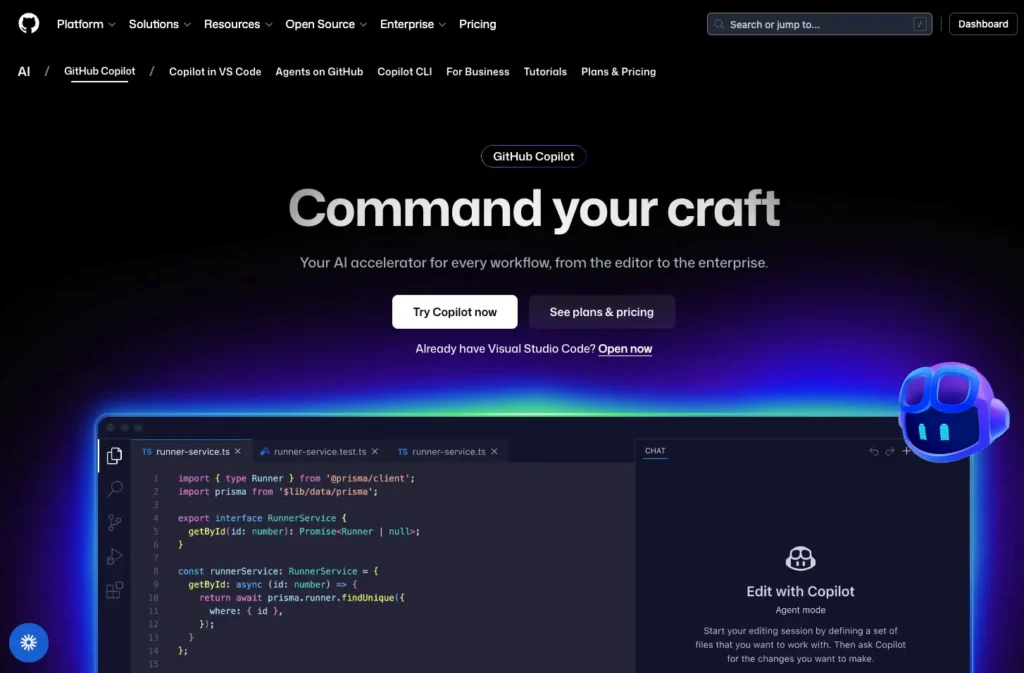
GitHub Copilot is widely considered the tool that brought AI-assisted coding into the mainstream. Developed by GitHub in collaboration with OpenAI, Copilot integrates directly into popular editors such as Visual Studio Code and JetBrains IDEs.
What makes GitHub Copilot stand out is how naturally it fits into existing workflows. As you write code, Copilot suggests entire lines, functions, or even classes based on context. Over time, it adapts to your coding style and preferred patterns. For many developers, Copilot feels less like an external tool and more like an intelligent extension of their editor.
From a pricing perspective, GitHub Copilot is positioned as a premium but accessible product. Individual developers typically pay around $10 per month, while business plans cost more due to added security and management features. While it does not offer a fully free plan, many developers find the productivity boost worth the cost.
Copilot is especially effective for web development, backend APIs, and scripting languages. However, it focuses primarily on code generation and completion rather than acting as a full AI agent capable of managing entire projects independently.
Cursor
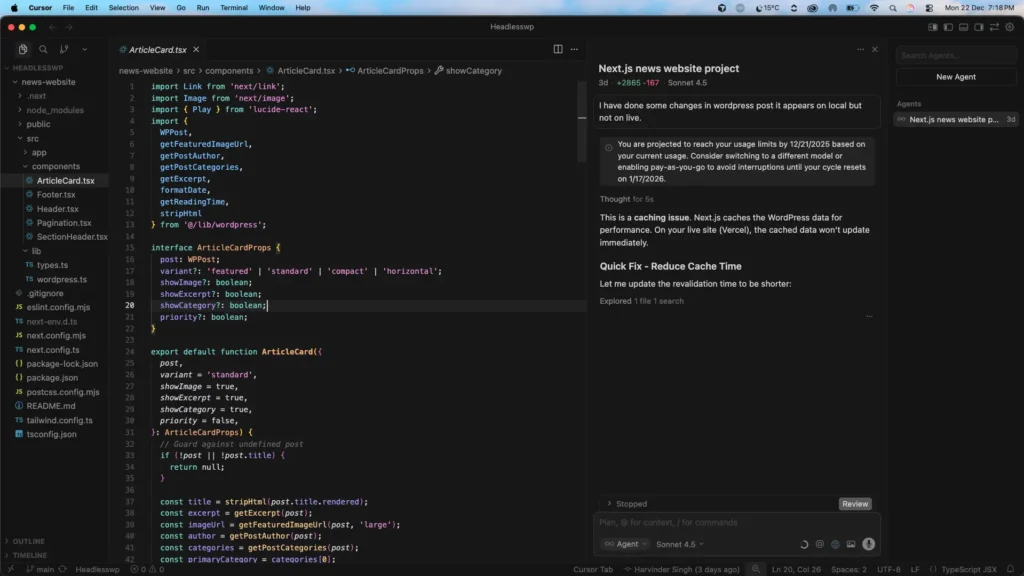
Cursor represents the next evolution of AI code editors. Instead of being a plugin layered onto an existing IDE, Cursor is designed from the ground up with AI at its core. It understands your entire codebase, allowing you to make changes across multiple files using natural language instructions.
For example, you can ask Cursor to refactor a feature, update an API response format, or migrate logic from one framework to another, and it will handle changes across the project intelligently. This deep contextual awareness makes Cursor particularly attractive for developers working on large or complex applications.
Cursor is typically priced around $20 per month, which makes it more expensive than traditional autocomplete tools. However, developers who work on long-term projects often justify the cost due to the significant reduction in manual refactoring and debugging time.
The main downside of Cursor is that it can be resource-intensive, especially on older machines. Still, for teams and individuals who want AI to act as a true coding partner rather than a suggestion engine, Cursor is one of the most advanced options available.
Windsurf
Windsurf takes a slightly different approach by emphasizing automation and AI-driven workflows. Instead of focusing solely on writing code, Windsurf aims to assist throughout the development lifecycle, including testing, debugging, and deployment.
Developers using Windsurf often describe it as an AI agent that not only writes code but also checks for errors, suggests improvements, and helps maintain code quality over time. This makes it particularly appealing for startups and SaaS teams that want to move quickly without sacrificing reliability.
Windsurf usually offers a free trial, with paid plans starting around $15 per month. While its community is smaller compared to GitHub Copilot, its feature set is growing rapidly, and it is gaining popularity among developers who want more than basic autocomplete.
Tabnine
Tabnine focuses on predictability, privacy, and team consistency. Unlike some AI tools that rely heavily on cloud-based models, Tabnine offers options for local or private deployments, making it attractive for enterprises with strict security requirements.
One of Tabnine’s strengths is its ability to learn and enforce a team’s coding style. Over time, it adapts to preferred patterns, naming conventions, and architectural decisions, ensuring consistency across large codebases.
Pricing for Tabnine typically starts around $12 per month. While it may not be as advanced as Cursor in terms of project-wide refactoring, it excels in environments where reliability and privacy matter more than cutting-edge AI features.
Codeium
Codeium has gained significant attention because it offers a powerful AI coding experience at no cost. Designed to support a wide range of programming languages, Codeium integrates with popular editors and provides intelligent autocomplete and suggestions.
For beginners and budget-conscious developers, Codeium is often the first step into AI-assisted coding. While it may not have the deep contextual understanding of premium tools, it performs exceptionally well for common development tasks.
The absence of a price tag makes Codeium especially appealing for students, freelancers starting out, and developers experimenting with AI tools for the first time.
JetBrains AI Assistant
JetBrains AI Assistant is tailored for developers who already use JetBrains products such as IntelliJ IDEA, PyCharm, and WebStorm. It integrates seamlessly into these environments, offering intelligent suggestions, refactoring assistance, and explanations.
This tool is particularly popular among Java and enterprise developers, where JetBrains IDEs already dominate. Pricing is typically higher than most competitors, averaging around $169 per year, but for professionals deeply invested in the JetBrains ecosystem, the integration quality justifies the cost.
Pricing Comparison and Value Considerations
When evaluating AI code editors, price should be considered alongside productivity gains. Free tools like Codeium provide excellent value for learning and small projects, while paid tools often pay for themselves by reducing development time on larger or more complex systems.
Monthly pricing generally ranges from free to around $20 per month. Enterprise solutions may cost more but include features such as team management, private models, and compliance support.
Key Trends in AI Code Editors (2025–2026)
One of the most significant trends is the shift from simple autocomplete to AI agents that can reason about entire projects. Developers increasingly expect AI tools to understand architecture, dependencies, and long-term implications of code changes.
Another major trend is privacy-focused AI, where organizations prefer tools that can run locally or within private infrastructure. This is especially important for companies handling sensitive data or proprietary algorithms.
Additionally, AI editors are becoming learning platforms. Many developers use them not only to write code faster but also to understand new languages, frameworks, and best practices through real-time explanations.
Choosing the Right AI Code Editor for Your Needs
Selecting the best AI code editor depends on your goals, experience level, and project complexity. Beginners often benefit from free tools that help them learn faster without financial commitment. Freelancers and small teams may prioritize versatility and cost-effectiveness, while enterprises focus on security, consistency, and integration.
There is no universal “best” tool; the ideal choice is the one that fits naturally into your workflow and helps you deliver better software with less effort.
Quick Comparison Table
| Tool | Best For | Price | Free Option |
|---|---|---|---|
| GitHub Copilot | Daily coding | $10/mo | ❌ |
| Cursor | AI-first dev | $20/mo | ❌ |
| Windsurf | Automation | $15/mo | Trial |
| Tabnine | Teams | $12/mo | Limited |
| Codeium | Beginners | Free | ✅ |
| JetBrains AI | Enterprise | $14/mo* | ❌ |
Which AI Code Editor Should You Choose?
Beginner / Student:
Codeium
Freelancer / WordPress Developer:
GitHub Copilot
Startup / SaaS Developer:
Cursor or Windsurf
Enterprise / Java Developer:
JetBrains AI
Do AI Code Editors Reduce Human Learning?
A common concern among developers is whether AI code editors are reducing real learning and problem-solving skills. With tools now capable of writing entire functions and fixing bugs automatically, it is reasonable to ask if developers are becoming overly dependent on AI. The reality, however, is more nuanced.
AI code editors do not inherently reduce human learning. Instead, they change how learning happens. When used incorrectly, they can slow down skill development. When used intentionally, they can significantly accelerate understanding and growth.
Developers who rely on AI tools only for copying and pasting code, without understanding the logic behind it, may experience weaker foundational skills over time. In such cases, AI becomes a shortcut rather than a learning aid. This behavior can limit critical thinking and reduce long-term problem-solving ability.
On the other hand, when AI code editors are used as learning companions, they can dramatically improve developer education. Tools like GitHub Copilot, Cursor, and Codeium can explain code logic, suggest alternative approaches, and highlight best practices in real time. Developers who ask why a solution works, instead of blindly accepting suggestions, often learn faster than with traditional tutorials.
Another important shift is that AI code editors reduce the need to memorize syntax and boilerplate code. Instead of spending time recalling exact function structures, developers can focus more on system design, architecture, performance, and security. This represents a move from surface-level learning to deeper conceptual understanding.
The impact of AI tools also differs by experience level. Beginners may struggle if they depend too heavily on AI-generated code without studying it. However, when beginners actively review AI suggestions and experiment with changes, they often progress faster than those learning without AI assistance. For experienced developers, AI editors remove repetitive tasks and free up mental space for higher-level decision-making.
The most important factor is how AI tools are used. AI code editors do not replace thinking; they amplify it. Developers who remain curious, question suggestions, and validate outputs continue to grow their skills. Those who use AI passively may see limited learning benefits.
In conclusion, AI code editors are not reducing human learning. They are transforming it. When used responsibly, they act as powerful mentors that accelerate learning, improve code quality, and help developers adapt to modern software development demands.
Final Thoughts
AI code editors are no longer optional tools for developers who want to stay competitive. They are becoming foundational components of modern software development. As we move further into 2026, the gap between developers who embrace AI assistance and those who do not will continue to grow.
Whether you choose GitHub Copilot for its simplicity, Cursor for its deep intelligence, or Codeium for its accessibility, adopting an AI code editor is one of the smartest decisions a developer can make today.
Frequently Asked Questions
Are AI code editors worth using in 2026?
Yes, AI code editors are worth using in 2026 because they significantly improve productivity, reduce bugs, and help developers learn faster.
Which is the best AI code editor for beginners?
For beginners, Codeium is one of the best AI code editors because it is free, easy to use, and supports many programming languages.
Is GitHub Copilot better than Cursor?
GitHub Copilot is better for daily coding tasks, while Cursor is better for large projects that need deep codebase understanding.
Can AI code editors replace human developers?
No, AI code editors cannot replace human developers. They assist developers by speeding up work, but human logic and decision-making are still essential.
Do AI code editors work with WordPress development?
Yes, AI code editors work very well with WordPress development by helping write PHP, JavaScript, custom plugins, and theme code faster.
Are AI code editors safe for professional projects?
AI code editors are safe for professional projects if used carefully, reviewed properly, and combined with secure development practices.
How much does an AI code editor cost on average?
Most AI code editors cost between $10 and $20 per month, while some tools also provide free plans with limited features.
What is the future of AI code editors?
The future of AI code editors includes smarter AI agents, full project understanding, better privacy, and deeper integration into development workflows.