
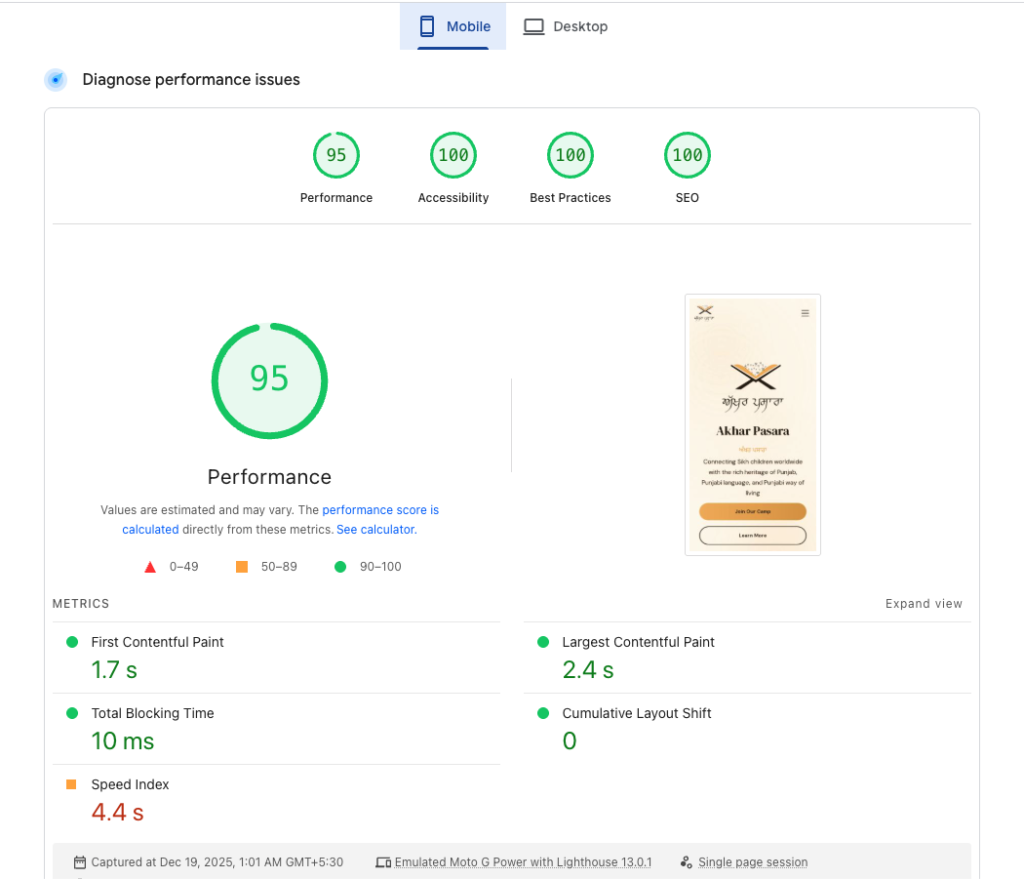
At the same time, Google has made it very clear: website performance matters. Metrics such as Google PageSpeed Insights, Lighthouse scores, and Core Web Vitals now directly influence SEO rankings, user engagement, and brand credibility.
In this blog, we’ll break down how we build websites that consistently achieve 95–100 Google PageSpeed and Lighthouse scores, using modern technologies like WordPress and Next.js, while maintaining scalability, accessibility, and long-term performance.
This guide is written for business owners, marketers, and developers who want to understand what truly goes into building a fast, SEO-friendly website — without shortcuts or gimmicks.
What Is Google PageSpeed Optimization Insights & Lighthouse?
Google PageSpeed Insights and Lighthouse are performance auditing tools developed by Google to evaluate how well a website performs across multiple dimensions.
Google PageSpeed Optimization Insights focuses on:
- Real-world user performance (field data)
- Core Web Vitals
- Mobile and desktop speed
Lighthouse evaluates:
- Performance
- Accessibility
- Best Practices
- SEO
Each category is scored from 0–100, and achieving a score above 90 is considered excellent.
However, consistently hitting 95–100 scores on mobile — where performance is hardest — requires a carefully planned technical strategy, not just plugins or themes.
Why Website Page Speed Matters More Than Ever
1. Speed Directly Impacts SEO
Google uses Core Web Vitals as ranking signals. Slow websites are more likely to drop in search rankings, especially on mobile.
2. Faster Websites Convert Better
Studies consistently show:
- A 1-second delay can reduce conversions by up to 7%
- Faster pages increase user engagement and session duration
3. Mobile Users Expect Instant Loading
More than half of global web traffic comes from mobile devices. Mobile-first performance is no longer optional.
4. Brand Trust & Credibility
A fast website feels professional. A slow website feels outdated — regardless of how good it looks.
Understanding Core Web Vitals (The Foundation of Performance)
Core Web Vitals are a set of performance metrics that Google uses to measure real user experience.
Largest Contentful Paint (LCP)
- Measures how quickly the main content loads
- Ideal target: Under 2.5 seconds
First Contentful Paint (FCP)
- Measures when the first visible element appears
- Helps users feel the site is loading
Total Blocking Time (TBT)
- Measures how long the browser is blocked by JavaScript
- Lower TBT = smoother interaction
Cumulative Layout Shift (CLS)
- Measures unexpected layout movement
- Ideal score: 0.0
Optimizing these metrics is essential to achieving high Lighthouse scores.
Technology Stack Matters: WordPress vs Next.js
The technology used to build a website plays a major role in performance outcomes.
WordPress (When Done Right)
WordPress powers over 40% of the web — but performance varies drastically depending on how it’s built.
High-performance WordPress requires:
- Lightweight themes (or custom themes)
- Minimal plugins
- Clean PHP and database queries
- Proper caching and CDN integration
When optimized correctly, WordPress websites can easily achieve 95–100 PageSpeed scores.
Next.js (Performance by Design)
Next.js is a modern React framework built for performance and scalability.
Key advantages:
- Server-side rendering (SSR)
- Static site generation (SSG)
- Automatic code splitting
- Image optimization
- Edge rendering support
Next.js is ideal for:
- High-traffic websites
- SaaS platforms
- Marketing sites focused on performance
- SEO-critical applications
Our Performance-First Website Development Approach
Achieving high PageSpeed scores is not about fixing issues after launch — it starts from day one.
1. Mobile-First Architecture
We design and develop with mobile performance as the top priority:
- Smaller payloads
- Optimized layouts
- Touch-friendly interactions
- Reduced JavaScript execution
2. Clean, Minimal Codebase
We avoid unnecessary frameworks, scripts, and bloated components.
- No unused CSS
- No render-blocking JS
- No heavy animations unless needed
Every line of code has a purpose.
3. Image Optimization (Done Properly)
Images are often the biggest performance bottleneck.
Our process includes:
- Modern formats (WebP / AVIF)
- Responsive image sizes
- Lazy loading
- Proper dimensions to prevent layout shifts
4. JavaScript & CSS Optimization
- Deferred non-critical JavaScript
- Inline critical CSS
- Minified assets
- Tree-shaking for unused code
This dramatically reduces Total Blocking Time.
5. Server & Hosting Optimization
Performance doesn’t stop at the frontend.
We optimize:
- Hosting environment
- PHP versions (for WordPress)
- Node environments (for Next.js)
- HTTP/2 or HTTP/3
- CDN configuration
How We do Google PageSpeed Optimization for WordPress for 95–100 PageSpeed Scores
WordPress performance requires precision.
Key Optimization Techniques:
- Custom lightweight themes
- Plugin audit and removal
- Database optimization
- Advanced caching (page, object, browser)
- CDN integration
- Optimized fonts and icons
- Secure, fast hosting configuration
We do not rely on “install one plugin and hope for the best” strategies.
How We Build High-Performance Websites with Next.js
Next.js gives us fine-grained control over performance.
Our Next.js Optimization Strategy:
- Static generation where possible
- Server-side rendering only when needed
- Dynamic imports for heavy components
- Optimized API calls
- Image component usage
- Edge caching for global performance
This allows us to deliver lightning-fast websites across regions.
Real Results: 95–100 Lighthouse Scores (Mobile)
With the right strategy, high scores are achievable — even on mobile devices.
Typical results include:
- Performance: 95–100
- Accessibility: 100
- Best Practices: 100
- SEO: 100
- CLS: 0
- TBT: Near zero
These results are not temporary — they are maintainable because the foundation is built correctly.
Tools We Use for Performance Testing & Google PageSpeed Optimization
We rely on industry-standard tools to validate real performance:
- Google Lighthouse
- PageSpeed Insights
- Chrome DevTools
- WebPageTest
- GTmetrix
- Real-user monitoring tools
We test across devices, locations, and network conditions.
Common Myths About Google PageSpeed Optimization
“PageSpeed 100 Is Not Realistic”
It is realistic — when the site is built correctly.
“Design Must Be Simple to Be Fast”
Modern, visually rich websites can still be fast with the right implementation.
“Plugins Can Fix Everything”
Plugins help, but architecture matters more.
SEO Benefits of a High-Performance Website
A fast website improves:
- Search rankings
- Crawl efficiency
- User engagement
- Bounce rates
- Conversion rates
Performance is no longer just a technical metric — it’s a growth driver.
Who Should Invest in Google PageSpeed Optimization?
- Business websites
- Service providers
- E-commerce stores
- SaaS platforms
- Startups
- Agencies
- Content-heavy blogs
If your website is slow, you are losing traffic — even if you don’t see it immediately. check your website pagespeed on Google PageSpeed Optimization tool
WordPress or Next.js: Which Is Right for You?
Choose WordPress if:
- You need content flexibility
- You want easy CMS management
- You need faster launch time
Choose Next.js if:
- Performance is mission-critical
- You expect scale
- You want modern architecture
- SEO and speed are top priorities
We often combine both using headless WordPress + Next.js for the best of both worlds.
Final Thoughts: Speed Is Not an Option — It’s a Standard
A high-performing website is no longer a luxury. It’s the baseline expectation.
By combining:
- Performance-first development
- Clean architecture
- Modern frameworks
- SEO best practices
We consistently build websites that achieve 95–100 WordPress Website Google Page speed & Lighthouse scores — without compromising design, functionality, or scalability.
Need a Fast Website or PageSpeed Optimization?
If you’re looking to Google PageSpeed Optimization:
- Improve Google PageSpeed scores
- Google PageSpeed Optimization Core Web Vitals
- Build a fast WordPress or Next.js website
- Deliver better user experience globally
We’re ready to help.